RGB Control Software Compared – Razer Synapse vs Logitech G Hub

RGB lighting has become an essential component of modern gaming setups, with peripherals, components, and even
furniture featuring customizable LED illumination. Managing this lighting symphony requires dedicated software
platforms, each with distinct approaches to customization, performance optimization, and ecosystem integration.
The three dominant RGB control platforms—Razer Synapse, Logitech G Hub, and Corsair iCUE—compete for desktop
real estate while offering increasingly sophisticated lighting control and peripheral management features.
Understanding the strengths, limitations, and system impact of each platform helps gamers choose peripherals
that integrate seamlessly with their existing ecosystems or identify which platform best suits their lighting
customization ambitions.
I. Razer Synapse 4: The Ecosystem Pioneer
Platform Overview and Evolution
Razer Synapse pioneered the concept of cloud-connected peripheral management, originally launching in 2011 and
evolving through multiple major versions. Synapse 4 represents the latest iteration, built from the ground up
with a modernized interface, improved performance, and enhanced integration with the broader Razer ecosystem
including Razer Cortex for game optimization and Razer Axon for wallpaper customization.
The platform supports all Razer peripherals manufactured from 2016 onward, with older devices requiring the
legacy Synapse 3 installation. Both applications can run simultaneously to support mixed-generation peripheral
setups, though running both increases overall system resource consumption.
Lighting Customization Features
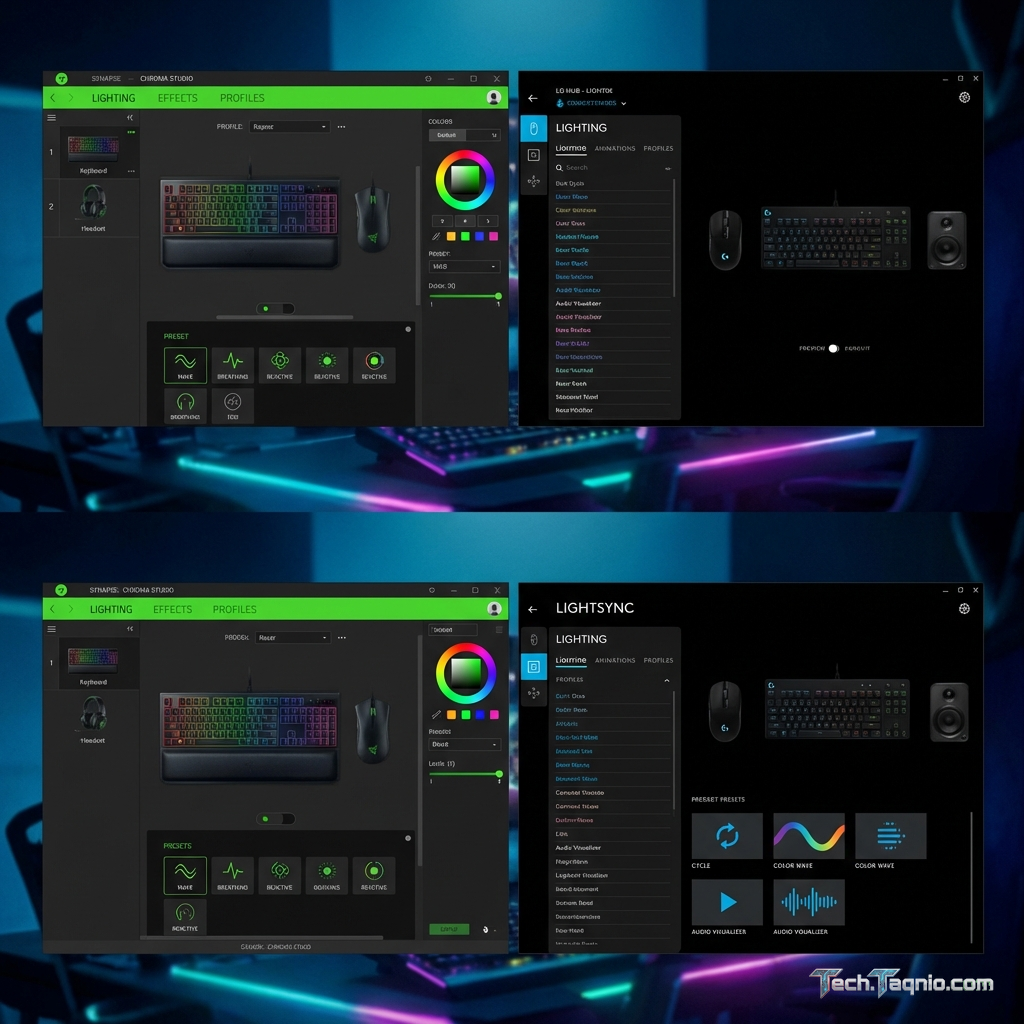
Chroma Studio provides the primary lighting customization interface, offering layer-based effect creation similar
to graphics editing software. Users can apply multiple effects to individual keys, zones, or entire devices,
with
effects stacking and blending according to layer order and opacity settings.
The Chroma effect library includes over 50 preset effects ranging from simple static colors and breathing
patterns to complex reactive effects that respond to keyboard input, audio playback, or in-game events. The
Advanced Effects mode enables keyframe-based animation creation for users seeking precise control over lighting
sequences and transitions.
Chroma Workshop provides a community-driven repository of lighting profiles created by Razer users and partners.
Game-specific profiles synchronize lighting effects with in-game events—health bars that pulse red when low,
ability cooldowns reflected in key colors, or ambient lighting matching game environments. Over 500 games
officially support Chroma integration, with community profiles available for hundreds more.
Performance and Resource Usage
Synapse 4 improved significantly over Synapse 3’s often-criticized resource consumption. Modern installations
consume approximately 80-150MB of RAM during normal operation, with CPU utilization typically under 1% when
idle. Active lighting effects, particularly complex layered animations, can increase CPU usage to 2-4% depending
on effect complexity and number of connected devices.
The application launches at system startup by default, adding 2-3 seconds to boot time depending on connected
device count. Users can disable auto-launch, though this prevents cloud profile synchronization and
game-specific
lighting integration from activating automatically.
Beyond Lighting: Additional Features
Synapse extends beyond lighting control to provide comprehensive peripheral management. Macro recording and
editing enables complex input sequences with adjustable timing, useful for productivity applications and games
supporting macro functionality. Device-specific features like DPI adjustment, polling rate configuration, and
key remapping are accessible through unified interfaces.
Chroma Connect enables integration with third-party hardware and software supporting the Razer Chroma SDK.
Compatible products from Philips Hue, Nanoleaf, and other smart lighting manufacturers can synchronize with
Razer peripheral lighting, creating whole-room lighting experiences controlled through a single platform.
II. Logitech G Hub: Polish and Performance
Platform Overview and Design Philosophy
Logitech G Hub replaced the aging Logitech Gaming Software in 2018, introducing a modernized visual design
and feature set for Logitech G series peripherals. The platform emphasizes streamlined workflows and performance
optimization, targeting gamers who prefer efficient configuration over extensive customization depth.
G Hub supports all Logitech G series peripherals, including keyboards, mice, headsets, and speakers. Some
professional series products (MX Master mice, Ergo keyboards) receive limited G Hub support, primarily for
firmware updates and basic customization, with full features reserved for gaming-branded devices.
LIGHTSYNC Lighting System
LIGHTSYNC represents Logitech’s RGB lighting technology, offering zone-based and per-key lighting customization
depending on device capabilities. The effect library provides core animation presets including color cycles,
breathing patterns, and audio visualizers that react to system audio or microphone input.
The integration with popular games enables screen-sampler lighting that analyzes on-screen colors and reflects
them in peripheral lighting. This creates ambient lighting that matches game environments without requiring
game-specific SDK integration. The feature works with any game but introduces slight latency compared to
direct SDK integration.
Custom effect creation uses a simplified visual editor rather than layer-based composition. While less powerful
for complex animations, the approach enables faster profile creation for users wanting unique but uncomplicated
lighting setups. Pre-built templates accelerate effect creation for common scenarios.
Performance Characteristics
G Hub ranks among the more resource-efficient RGB control platforms. Memory consumption typically ranges from
60-100MB, with CPU utilization under 0.5% during normal operation. Even complex lighting effects rarely push
CPU usage above 2%, making G Hub suitable for systems where every resource counts.
Startup impact remains minimal at 1-2 seconds additional boot time. The application supports running in system
tray mode, minimizing desktop presence while maintaining full functionality. Automatic game profile switching
adds minimal overhead to game launch sequences.
Profile and Integration Features
Game-specific profiles associate peripheral configurations with specific applications, automatically switching
DPI settings, button assignments, and lighting effects when applications launch. The automatic detection works
reliably for installed Steam, Epic, and other launcher-based games, with manual application linking available
for executables not automatically recognized.
Discord integration enables voice activity lighting that reflects speaking status on compatible peripherals.
OBS Studio integration provides streaming-aware lighting effects and hotkey customization for content creators.
LGS profile import allows users transitioning from Logitech Gaming Software to preserve existing configurations.
III. Corsair iCUE: The Integration Champion
Platform Overview and Ecosystem Breadth
Corsair iCUE manages the broadest hardware ecosystem of any RGB control platform. Beyond peripherals, iCUE
controls Corsair case fans, AIO coolers, power supplies with RGB lighting, DRAM modules with integrated LEDs,
and even NVIDIA graphics cards through partnership features. This comprehensive control enables full system
lighting synchronization through a single application.
The platform supports both current and legacy Corsair products, maintaining compatibility with devices released
throughout the past decade. Hardware detection and configuration happens automatically upon device connection,
with firmware update notifications ensuring optimal performance and feature access.
Lighting and Effects System
iCUE’s lighting engine provides perhaps the most powerful customization capability among major platforms.
Layer-based effect composition supports unlimited layers with individual opacity, blend mode, and timing
controls. The effect library spans basic animations through complex reactive effects responding to system
metrics including CPU temperature, GPU utilization, and network activity.
The lighting wizard provides guided effect creation for users unfamiliar with manual layer manipulation.
Visual previews update in real-time as settings change, accelerating the iteration process. Hardware topology
views display connected devices and their lighting zones, enabling precise targeting of specific LEDs or
regions.
Murals enable coordinated lighting across multiple devices, treating separate peripherals as a unified canvas.
This feature particularly benefits users with extensive Corsair ecosystems, creating seamless lighting flows
that span keyboards, mouse pads, and case components.
Resource Consumption Considerations
iCUE’s comprehensive capabilities come with corresponding resource requirements. Memory consumption ranges from
150-300MB depending on connected device count and active features. CPU utilization varies significantly based
on configuration—simple static lighting may consume under 1%, while complex animated effects across numerous
devices can reach 3-5%.
The monitoring and fan control features, when enabled, add continuous system polling that increases CPU usage
and power consumption. Users prioritizing minimal impact should disable these features when not actively
monitoring, or create separate profiles for gaming versus monitoring scenarios.
Startup impact exceeds competitors at 3-5 seconds additional boot time, reflecting the comprehensive hardware
enumeration and initialization process. The delay proportionally increases with connected device count.
System Monitoring and Control
Beyond lighting, iCUE provides system monitoring displaying CPU and GPU temperatures, utilization, and clock
speeds. Fan curve customization enables temperature-responsive cooling profiles, useful for Corsair cases
equipped with iCUE-compatible fan controllers.
Commander Core and Commander Pro hardware enable comprehensive system integration, with iCUE providing the
software interface for temperature probe readings, fan tachometer monitoring, and RGB strip control. This
hardware-software combination creates professional-level system management within a gaming-focused platform.
IV. Feature Comparison Matrix
V. Cross-Platform Synchronization Options
SignalRGB: Universal Control Alternative
For users with peripherals spanning multiple brands, SignalRGB provides a unified control platform supporting
devices from Razer, Logitech, Corsair, and dozens of additional manufacturers. The application intercepts
hardware communication, enabling synchronized lighting effects across mixed-ecosystem setups.
SignalRGB operates free for basic features, with a Pro subscription ($2.99/month or $29.99/lifetime) unlocking
advanced effects, priority support, and additional integrations. The platform continuously adds device support,
though some advanced per-device features may require manufacturer-specific software alongside SignalRGB.
OpenRGB: Open-Source Alternative
OpenRGB provides completely free, open-source RGB control with broad hardware compatibility. The project
prioritizes reverse-engineering proprietary protocols to eliminate reliance on manufacturer software entirely.
Effect libraries remain more limited than commercial alternatives, but the eliminates background resource
consumption from multiple RGB applications.
The technical nature of OpenRGB configuration may challenge less experienced users, though community
documentation continues improving. For experienced users prioritizing minimal software bloat, OpenRGB enables
lightweight RGB control without manufacturer software dependencies.
Integration Standards: Aura Sync, Mystic Light, and RGB Fusion
Motherboard manufacturers provide their own RGB control platforms with varying device compatibility. ASUS Aura
Sync, MSI Mystic Light, and Gigabyte RGB Fusion primarily control motherboard-integrated lighting and compatible
RAM, but each supports limited peripheral integration from various manufacturers.
These platforms generally provide simpler interfaces than peripheral-focused alternatives, suitable for users
wanting basic synchronization without deep customization. Running motherboard RGB software alongside peripheral
software can create conflicts—users should typically choose one platform for peripherals and disable competing
RGB services to avoid lighting conflicts and resource duplication.
VI. Optimization Recommendations
Minimizing System Impact
Regardless of chosen platform, several strategies minimize resource consumption while maintaining RGB
functionality. Reduce effect complexity by avoiding numerous simultaneous layers or rapidly-updating animations.
Static colors and slow-cycling effects consume minimal resources compared to reactive or audio-visualizer
effects.
Disable unused features like system monitoring or advanced macro functionality if not actively required.
Each enabled feature potentially increases polling frequency and background processing. Consider creating
separate “performance” profiles with simplified lighting for competitive gaming sessions.
Allow applications to minimize to system tray rather than remaining in the foreground. Most RGB platforms
reduce their operational priority when minimized, slightly decreasing CPU consumption during gaming sessions.
Managing Multiple Platforms
Users with peripherals from multiple manufacturers face the challenge of running several RGB applications
simultaneously. Each platform adds to cumulative resource consumption, and potential conflicts can cause
unpredictable behavior or fail to properly control certain devices.
The most resource-efficient approach involves selecting peripherals from a single ecosystem, eliminating
multi-platform requirements. When mixing ecosystems is unavoidable, consider third-party unification tools
like SignalRGB that can potentially replace multiple manufacturer applications with a single platform.
If running multiple platforms, disable automatic startup for secondary platforms and launch them only when
actively adjusting settings. Most RGB configurations are stored on device and persist after software closes,
enabling reduced software runtime once desired effects are configured.
VII. Platform Selection Guide
Choose Razer Synapse If:
- Game-specific lighting integration matters—Razer’s 500+ game library leads the industry
- Complex, layered lighting effects are important to your aesthetic
- Smart home lighting integration through Philips Hue or Nanoleaf appeals
- Cloud profile synchronization across multiple PCs is required
- You value community lighting profiles from Chroma Workshop
Choose Logitech G Hub If:
- Minimal resource consumption is a priority
- Streamlined, efficient configuration workflows appeal over extensive customization
- Discord or streaming integrations are frequently used
- Audio-reactive lighting through screen sampling satisfies integration needs
- Fast startup and minimal boot delay matter
Choose Corsair iCUE If:
- System includes Corsair internal components (fans, AIO coolers, RAM)
- Comprehensive system monitoring through a single platform appeals
- Fan curve customization and temperature management are priorities
- Extensive multi-device synchronization (Murals) creates desired aesthetics
- Maximum customization depth justifies increased resource consumption
VIII. Conclusion
RGB control software has matured significantly, with each major platform now providing capable lighting
management alongside peripheral configuration tools. The differences between platforms increasingly reflect
design philosophy rather than fundamental capability gaps, making peripheral selection the primary factor
in platform choice.
Logitech G Hub earns our efficiency recommendation for gamers prioritizing minimal system impact, delivering
adequate customization with industry-leading resource efficiency. Razer Synapse provides the deepest game
integration library, ideal for users wanting lighting that actively responds to gameplay events. Corsair iCUE
delivers unmatched ecosystem breadth for builders using Corsair internal components.
For mixed-ecosystem setups, third-party solutions like SignalRGB merit serious consideration despite requiring
additional learning investment. The ability to control everything through a single platform often outweighs
the feature limitations compared to manufacturer software.
Whatever platform you choose, remember that RGB lighting exists to enhance your gaming experience—not complicate
it. Start with simple configurations, gradually explore advanced features, and don’t hesitate to disable effects
that create noticeable performance impact or visual fatigue during extended gaming sessions.