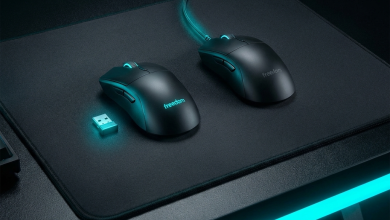
The wireless versus wired gaming mouse debate has evolved dramatically as technology advances have closed what was
once a significant performance gap. Professional esports players now regularly compete using wireless mice, a
development unthinkable just five years ago when wired connections dominated competitive gaming. Understanding
current technology capabilities helps gamers make informed decisions based on actual performance rather than
outdated assumptions about wireless limitations.
Modern wireless gaming mice from manufacturers like Logitech, Razer, and Pulsar have achieved latency levels that
match or approach wired alternatives, fundamentally changing the calculus for competitive gamers. The question has
shifted from “Can wireless compete with wired?” to “Which connection type best fits my specific gaming needs and
preferences?” Both approaches now offer viable paths to peak gaming performance.
This comprehensive guide examines wireless and wired gaming mice across every relevant performance dimension:
latency, weight, reliability, battery considerations, and practical gaming impact. We’ll analyze real-world
performance data, compare leading options in each category, and help you determine which connection type best serves
your competitive gaming aspirations.
I. Understanding Mouse Connection Technology
Before comparing performance outcomes, understanding how each connection type works establishes context for
evaluating their relative strengths and limitations.
How Wired Mice Work
Wired gaming mice transmit movement data through USB cables directly to the computer. The mouse sensor samples
surface movement at its polling rate (typically 1000Hz), then transmits that data as electrical signals through the
USB connection. The computer’s USB controller receives this data and updates cursor position accordingly.
The entire wired transmission chain operates with minimal latency—typically under 1 millisecond for the transmission
itself. This near-instantaneous connection has historically made wired mice the default choice for competitive
gaming where microseconds matter.
USB polling rate determines how frequently the computer requests updates from the mouse. Standard 1000Hz polling
means the computer checks for new data 1000 times per second (every 1ms). Some gaming mice now offer 8000Hz polling
(every 0.125ms), though practical benefits beyond 1000Hz remain debatable.
How Wireless Mice Work
Wireless gaming mice use radio frequency (RF) transmission, typically at 2.4GHz, to send data from mouse to USB
receiver. The mouse sensor samples movement identically to wired alternatives, then wirelessly transmits that data
to the receiver plugged into the computer’s USB port.
The wireless transmission adds processing steps: encoding data for wireless transmission, actual radio transmission,
receiving and decoding at the USB receiver, then forwarding to the computer. Each step adds potential latency,
though modern implementations have minimized these delays to imperceptible levels.
Wireless mice require power sources—either rechargeable batteries or replaceable batteries—adding weight
considerations and introducing battery life as a factor. Running out of power mid-match represents a real concern
that wired mice don’t share.
Bluetooth vs. 2.4GHz Wireless
Gaming wireless mice almost universally use proprietary 2.4GHz connections rather than Bluetooth. Bluetooth
prioritizes energy efficiency over speed, resulting in latency unsuitable for competitive gaming (typically 10-30ms
versus 1ms for 2.4GHz).
Proprietary 2.4GHz protocols like Logitech LIGHTSPEED, Razer HyperSpeed, and SteelSeries Quantum 2.0 optimize
specifically for low-latency gaming applications. These protocols sacrifice battery efficiency for speed, achieving
latency matching or approaching wired connections.
Some wireless mice include Bluetooth as a secondary option for non-gaming use where battery life matters more than
latency. Avoid Bluetooth for competitive gaming regardless of mouse quality—the protocol itself limits performance.
II. Latency Comparison: The Critical Factor
Input latency—the delay between physical mouse movement and on-screen cursor response—represents the most critical
performance factor for competitive gaming. Examine how current wireless technology compares to wired standards.
Measuring Mouse Latency
Accurate latency measurement requires specialized equipment capturing both physical movement and screen response.
High-speed cameras filming button presses alongside screen output can measure total system latency, while hardware
analyzers capture mouse-specific delay before signal reaches the computer.
Reported latency figures vary based on measurement methodology. Manufacturers typically report mouse-specific latency
(sensor-to-transmission), while reviewers often measure click-to-screen latency (including monitor response time).
Compare figures using consistent methodology to ensure accurate evaluation.
Practical latency perception varies individually. Research suggests most humans cannot perceive latency differences
below 10-15ms, though some competitive players claim sensitivity to single-millisecond variations during intense
gameplay. Scientific evidence for such sensitivity remains limited.
Current Wireless Latency Performance
Leading wireless gaming mice now achieve latency within 1ms of wired equivalents—a difference imperceptible in
practical gameplay. The Logitech G Pro X Superlight 2 at 4000Hz polling demonstrates 0.25ms average latency,
matching or exceeding many wired alternatives.
Razer’s HyperSpeed technology achieves similar performance, with the Viper V3 Pro measuring sub-1ms latency in
controlled testing. SteelSeries, Pulsar, and other manufacturers have achieved comparable results, establishing
wireless parity with wired as the new baseline for premium gaming mice.
Budget wireless mice typically exhibit higher latency than premium options, sometimes reaching 5-10ms—still
acceptable for casual gaming but noticeable for competitive players. Price correlates strongly with wireless latency
performance.
Wired Latency Baseline
Quality wired gaming mice operate at approximately 1ms latency at standard 1000Hz polling, with 8000Hz polling
options reducing theoretical minimum to 0.125ms. This establishes the benchmark wireless mice must match for
competitive viability.
In practice, even budget wired mice achieve latency suitable for competitive gaming. The wired connection’s inherent
speed advantage means even inexpensive sensors and controllers deliver consistent low-latency performance. Wireless
technology required years of development to match what wired connections provided inherently.
Latency Comparison Table
| Mouse Model | Connection | Max Polling Rate | Click Latency | Motion Latency |
|---|---|---|---|---|
| Logitech G Pro X Superlight 2 | Wireless | 4000Hz | 0.4ms | 0.25ms |
| Razer Viper V3 Pro | Wireless | 8000Hz* | 0.3ms | 0.125ms |
| Logitech G303 Shroud Edition | Wireless | 2000Hz | 0.5ms | 0.5ms |
| Razer DeathAdder V3 (Wired) | Wired | 8000Hz | 0.3ms | 0.125ms |
| Zowie EC2-C | Wired | 1000Hz | 0.8ms | 1.0ms |
| Budget Wireless Mouse | Wireless | 125Hz | 8-15ms | 8-15ms |
*Razer 8000Hz polling requires separate HyperPolling dongle purchase
III. Weight Considerations
Mouse weight significantly impacts gaming performance, particularly for FPS players who rely on quick, precise
movements. Compare how connection type affects weight characteristics.
Wireless Weight Requirements
Wireless mice must include batteries and wireless transmission electronics, inherently adding weight compared to
wired equivalents. Battery cells weigh 15-30 grams depending on capacity, while wireless circuitry adds 3-5 grams.
These additions historically made wireless mice 20-40% heavier than wired alternatives.
Modern engineering has dramatically reduced this penalty. The Razer Viper V3 Pro achieves 54 grams despite wireless
internals—lighter than many wired mice. The Logitech G Pro X Superlight 2 reaches 60 grams, competitive with
lightweight wired options. Manufacturers now engineer specifically around wireless weight minimization.
Battery capacity trades against weight. Larger batteries provide longer operational time but increase weight. Most
competitive players accept charging frequency in exchange for lower weight, preferring sub-60g mice with 70-hour
battery over heavier options with multi-week runtime.
Wired Weight Advantages
Wired mice eliminate battery and wireless component weight, establishing lower achievable minimums. Ultra-light wired
mice reach weights impossible for wireless alternatives: the Finalmouse UltralightX achieves 29 grams, while
numerous wired options fall below 50 grams.
However, the cable itself creates resistance affecting perceived weight and movement feel. Even high-quality paracord
cables impart subtle drag that influences fast mouse movements. This cable drag partially offsets the raw weight
advantage, particularly when cables aren’t optimally positioned with bungees or mouse bungees.
For gamers who prioritize absolute minimum weight, wired mice maintain advantage. For those valuing overall movement
freedom, wireless eliminates cable drag entirely, potentially providing better practical feel despite slightly
higher scale weight.
Weight Comparison Table
| Mouse Model | Connection | Weight | Battery Life |
|---|---|---|---|
| Finalmouse UltralightX | Wired | 29g | N/A |
| Razer Viper V3 Pro | Wireless | 54g | 95 hours |
| Logitech G Pro X Superlight 2 | Wireless | 60g | 95 hours |
| Razer DeathAdder V3 (Wired) | Wired | 59g | N/A |
| Zowie EC2-C | Wired | 73g | N/A |
| SteelSeries Aerox 5 Wireless | Wireless | 74g | 180 hours |
IV. Reliability and Consistency
Reliable performance matters for competitive gaming where a single input failure can determine match outcomes.
Compare reliability characteristics between connection types.
Wired Connection Reliability
Wired connections provide inherent reliability through direct electrical transmission. Barring physical cable damage,
wired mice maintain consistent performance indefinitely. No batteries to die, no wireless interference to cause
issues, no connections to drop.
Cable durability represents the primary reliability concern for wired mice. Repeated bending at connection points,
cable drag, and physical stress can eventually cause wire fatigue and connection issues. Quality cables with strain
relief and flexible construction minimize this concern, while paracord cables combine flexibility with durability.
Cable management solutions like mouse bungees extend cable lifespan while improving movement feel. Proper cable
routing prevents sharp bends that accelerate wear, making cable longevity largely manageable with appropriate
accessories.
Wireless Connection Reliability
Modern wireless gaming mice achieve remarkable connection stability, though potential failure modes exist that wired
mice don’t share. Understanding these modes helps prevent issues during critical gaming moments.
Battery Depletion: The most common wireless failure occurs when batteries die unexpectedly. Quality
wireless mice provide battery indicators and low-power warnings, but gaming focus may lead to missing these alerts.
Establishing charging routines prevents this issue—charge nightly, or charge during breaks before extended sessions.
Wireless Interference: Dense wireless environments with multiple 2.4GHz devices (WiFi routers,
wireless keyboards, other wireless mice) can theoretically cause interference. In practice, modern hopping protocols
minimize this concern, but users experiencing inexplicable input issues should evaluate their wireless environment.
Receiver Placement: Distance and obstacles between mouse and receiver affect connection quality.
Place receivers as close to mouse usage area as possible, ideally with line-of-sight. Receiver extension cables
position receivers optimally for challenging setups.
Professional Esports Adoption
Professional esports players’ equipment choices indicate real-world reliability assessments. Wireless mice now
dominate professional play, with the Logitech G Pro X Superlight and Razer equivalents appearing across tournaments
worldwide.
This professional adoption validates wireless reliability for the highest-stakes gaming scenarios. Teams and players
whose livelihoods depend on equipment performance have accepted wireless mice as competitive-ready, effectively
ending reliability debates that once favored wired connections exclusively.
V. Practical Gaming Considerations
Beyond raw specifications, practical factors influence day-to-day gaming experience with each connection type.
Cable Management Freedom
Wireless mice eliminate cable management requirements entirely. No cable drag, no bungees needed, no concern about
cable tangling during intense movements. This freedom allows natural, unrestricted arm movements impossible with
wired connections regardless of cable quality.
For gamers who use large mousepads with full arm aiming, wireless eliminates a genuine impediment to optimal
movement. The difference becomes particularly apparent during wide sweeps across the mousepad where cables would
otherwise create resistance.
Portability Advantages
Laptop gamers and those who transport setups benefit enormously from wireless. No cables to pack, no tangles to
untangle, simpler setup at destination. The receiver tucks into a laptop port or travels in a small case.
Tournament players traveling to LAN events appreciate reduced setup complexity. Plug in receiver, place mouse on pad,
play. Wired setup requires cable routing, bungee positioning, and more desk space management.
Charging Considerations
Battery maintenance adds a responsibility wireless users must accept. Forgetting to charge means potentially
mid-session charging or borrowing backup equipment. Wired mice supply infinite power through the cable with zero
preparation required.
Wireless charging mousepads like Logitech PowerPlay eliminate this concern by charging during use, though at
significant cost premium. Standard charging while not gaming remains the practical solution for most users.
Modern battery life (typically 70-100 hours for gaming mice) makes daily charging unnecessary for most users. Weekly
charging or opportunistic charging during breaks maintains adequate power for typical usage patterns.
VI. Price Comparison
Budget considerations affect many purchasing decisions. Examine pricing differences between connection types.
Wireless Premium Explained
Wireless gaming mice command $30-$80 premiums over wired equivalents from the same manufacturer. This premium covers
battery, wireless transmission hardware, receiver, and associated engineering required for competitive-grade
wireless performance.
The premium has decreased as wireless technology matures. Early gaming wireless mice commanded 100%+ premiums over
wired options; current premiums represent 20-40% increases—more justified given the practical advantages wireless
provides.
Budget-Conscious Recommendations
Gamers on tight budgets generally find better value in wired mice. Quality wired gaming mice start around $30-50,
delivering excellent sensor and build quality suitable for competitive gaming. Comparable wireless quality requires
$80-100 minimum investment.
The Logitech G305 at $49.99 represents the budget wireless exception, offering competitive-grade LIGHTSPEED
technology at accessible pricing. Its AA battery requirement adds slight inconvenience and weight, but wireless
freedom comes at price point challenging wired value propositions.
Price-Performance Comparison Table
| Price Tier | Best Wired Option | Best Wireless Option |
|---|---|---|
| Under $50 | Razer DeathAdder Essential ($29) | Logitech G305 ($49) |
| $50-$100 | Zowie EC2-C ($80) | Logitech G502 X ($80) |
| $100-$150 | Razer DeathAdder V3 ($90) | Razer DeathAdder V3 Pro ($149) |
| $150+ | Finalmouse UltralightX ($189) | Logitech G Pro X Superlight 2 ($159) |
VII. Which Is Better for Competitive Gaming?
The definitive answer depends on specific priorities and circumstances. Evaluate these factors to determine your
optimal choice.
Choose Wireless If…
You prioritize unrestricted movement and appreciate the freedom wireless provides. Cable drag, however minimal,
bothers you during gameplay. You can reliably maintain charging habits to prevent battery depletion during important
sessions.
You transport your gaming setup regularly. Laptop gamers, tournament attendees, and those who game in multiple
locations benefit enormously from wireless portability.
You can afford the premium. Competitive-grade wireless mice cost $100-160, versus $60-100 for comparable wired
alternatives. This premium provides genuine advantages worth paying for if budget permits.
Choose Wired If…
You prioritize absolute minimum weight. Sub-50g mice remain exclusively wired territory. If you’ve optimized every
other aspect of your setup and seek marginal weight improvements, wired provides options wireless cannot match.
Budget constraints limit spending. Quality wired mice deliver excellent performance at $30-60 price points where
wireless alternatives don’t compete effectively.
You value zero-maintenance operation. Plug in, play forever. No charging, no battery monitoring, no receiver
placement concerns. Wired mice operate indefinitely with zero ongoing attention.
For Most Competitive Gamers…
Wireless gaming mice represent the better choice for the majority of competitive players in 2026. The technology has
matured to parity with wired performance while providing genuine advantages in movement freedom and convenience.
Professional adoption validates this recommendation. The gaming mice most used in professional play are wireless—the
Logitech G Pro X Superlight and Razer Viper V3 Pro. These players have every incentive to use optimal equipment;
their wireless choice reflects objective evaluation of current technology.
VIII. Conclusion
The wireless versus wired gaming mouse debate has effectively been resolved by technological advancement. Modern
wireless gaming mice achieve latency parity with wired alternatives while providing movement freedom and convenience
advantages that make them the preferred choice for most competitive gamers.
Wired mice maintain relevance for budget-conscious gamers seeking quality at lower prices and for weight-obsessed
players seeking absolute minimum scale numbers. The cable drag penalty partially offsets raw weight advantage, but
gamers prioritizing minimal sensor-to-pad distance will continue preferring the lightest possible options.
For competitive gaming in 2026, choose wireless unless specific circumstances favor wired alternatives. The
technology premium delivers genuine performance advantages that most serious gamers find worthwhile. Professional
players have voted with their equipment choices—wireless mice now dominate competitive play, validating their
capability for the highest-stakes gaming scenarios.
For complete gaming mouse guidance, explore our articles on best gaming
mice for FPS games and choosing the right gaming
mousepad.