Gaming sessions lasting hours demand seating that supports proper posture without causing fatigue or long-term health
issues. The gaming chair market ranges from budget-friendly basic options to premium ergonomic solutions, with
significant differences in build quality, adjustability, and comfort. Understanding which features genuinely matter
helps separate marketing hype from functional value.
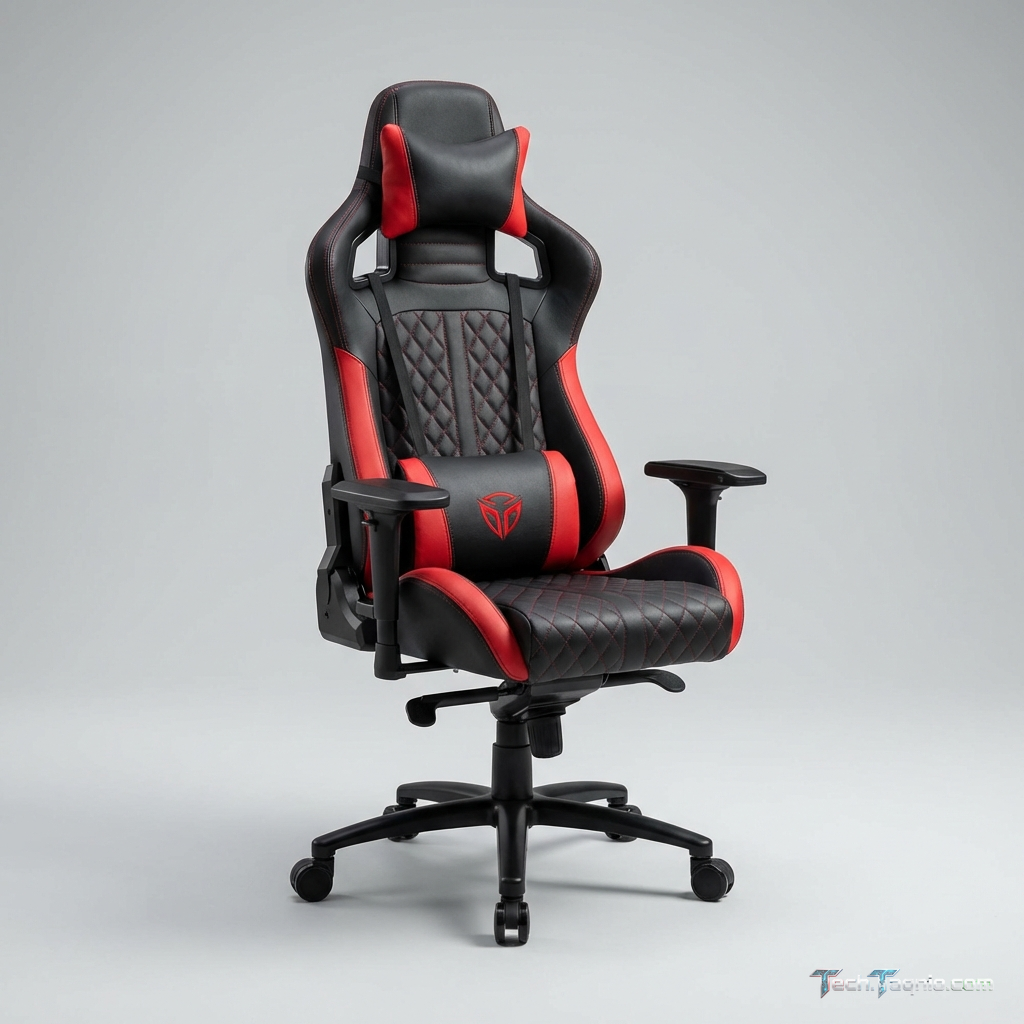
Many gaming chairs prioritize aesthetics—racing-style designs, RGB lighting, aggressive branding—over substantive
ergonomic engineering. While visual appeal matters, the features determining long-term comfort and health remain the
adjustability mechanisms, lumbar support systems, and construction quality hidden beneath fabric and leather
surfaces.
This comprehensive guide examines the ergonomic features that actually matter when selecting a gaming chair in 2026.
I. Understanding Ergonomic Seating Principles
Ergonomic design aims to support natural body positioning, reducing strain during extended use.
Proper Sitting Posture
Healthy seated posture places your body in alignment:
- Feet: Flat on floor, thighs slightly downward-angled
- Thighs: Parallel to floor or slightly sloped down
- Back: Upright with natural lumbar curve supported
- Shoulders: Relaxed, not hunched forward
- Arms: Elbows at approximately 90°, forearms parallel to floor
- Head: Neutral position, not craned forward toward screen
Gaming chairs should facilitate this posture through adjustable components that accommodate different body dimensions
and preferences.
The Dangers of Poor Seating
Extended gaming in improperly supportive chairs causes:
Lower back pain: Insufficient lumbar support allows spine to flatten, stressing vertebrae and
muscles
Neck strain: Forward head posture from poor upper back support creates compressive force on cervical
spine
Shoulder tension: Armrests at wrong height cause shoulder elevation or drooping
Poor circulation: Seat edges compressing thighs restrict blood flow
Long-term issues: Chronic poor posture leads to persistent pain, degenerative changes, and reduced
gaming enjoyment
II. Essential Ergonomic Features
Lumbar Support
The single most important feature for long gaming sessions. The lumbar region (lower back) requires support to
maintain natural spinal curvature.
Adjustable lumbar systems: Premium chairs offer adjustable lumbar depth and height. Mechanical
systems with knobs or levers allow fine-tuning support position exactly where your back needs it. This customization
accommodates different body shapes and seating preferences.
Lumbar pillows: Budget chairs often include separate lumbar pillows strapped to the backrest. While
functional, positioning requires manual adjustment, and pillows shift during use. Pillows work adequately but
integrated adjustable systems perform better.
Fixed lumbar curves: Some chairs incorporate fixed lumbar shaping in the backrest. These provide
support without adjustment but won’t suit all body types. Verify lumbar position matches your back before
purchasing.
Seat Height Adjustment
Universal feature on any worthwhile chair, but adjustment range matters:
- Verify lowest setting allows feet flat on floor for your height
- Check highest setting reaches appropriate desk height
- Gas lift quality affects adjustment smoothness and longevity
- Class 4 gas lifts provide superior durability to Class 3
Seat Depth and Tilt
Seat depth adjustment: Slides seat pan forward/backward to accommodate different thigh lengths.
Proper depth leaves 2-3 fingers between seat edge and back of knee—preventing thigh compression while maintaining
back contact with backrest.
Seat tilt: Allows seat pan angle adjustment independent of backrest. Forward tilt opens hip angle,
reducing lower back pressure. Many users prefer slight forward tilt for active gaming, neutral for relaxed sessions.
Backrest Recline
Quality chairs offer adjustable recline angles:
Recline range: 90° (fully upright) to 135°+ (significant recline). Different angles suit different
activities—upright for intense competitive gaming, reclined for casual sessions or media consumption.
Recline lock: Ability to lock backrest at specific angles provides stable support. Chairs allowing
only rocking motion require constant muscle engagement to maintain position.
Tension adjustment: Controls resistance when reclining, accommodating different user weights and
preferences.
Armrest Adjustability
Armrests significantly impact shoulder and arm comfort. Dimension of adjustment indicates quality:
2D Armrests: Height and pivot adjustment. Basic acceptable functionality.
3D Armrests: Add forward/backward sliding. Enables better positioning relative to desk.
4D Armrests: Include width adjustment (sliding inward/outward). Full customization for optimal arm
support.
4D armrests provide maximum accommodation for different body widths, desk configurations, and gaming positions. The
upgrade from 2D provides meaningful comfort improvement.
Headrest Support
Tall backrests with integrated or adjustable headrests support neck during reclined use:
Adjustable headrest: Height and angle adjustment positions support precisely where neck requires it
Removable headrest pillow: Separate pillow positioned on backrest. Adjustable by user but may shift
during use
Integrated headrest: Built into backrest shape. No adjustment but clean appearance
Headrest importance varies by use—essential for reclined gaming, less critical for upright competitive positioning.
III. Build Quality Indicators
Frame Construction
Steel frame: Quality chairs use steel internal framing for structural integrity. Verify manufacturer
specifications confirm steel rather than plastic skeleton.
Weight capacity: Higher rated capacity typically indicates stronger construction. Even if your
weight falls below capacity, higher ratings suggest more robust engineering.
Base quality: Five-star bases should be steel or heavy-duty aluminum, not plastic. Plastic bases
risk cracking under stress or failing after extended use.
Foam Density
Seat cushioning quality determines long-term comfort and durability:
High-density foam: Maintains shape, provides consistent support, lasts years without significant
compression
Low-density foam: Feels soft initially but compresses quickly, creating uncomfortable hardness
within months
Cold-cure foam: Premium option with excellent durability and comfort characteristics
Foam density specifications (measured in kg/m³) indicate quality—look for 50+ kg/m³ for seat cushions.
Upholstery Options
PU Leather: Common gaming chair covering. Varies dramatically in quality—premium PU feels genuine
and breathes reasonably; budget PU cracks, peels, and retains heat. Look for high-grade PU specifications.
Fabric/Mesh: Better breathability than leather, cooler in warm environments. Quality mesh options
exist but remain less common in gaming chair market.
Real Leather: Premium option with superior durability and aging characteristics. Significantly
higher cost but lasts longer than PU alternatives.
IV. Features Worth Considering
Rocking Function
Free-rocking from locked backrest position provides movement variety during long sessions. Research suggests periodic
movement improves circulation and reduces fatigue.
Footrests
Integrated retractable footrests enable full recline comfort. Less useful for active gaming but valuable for media
consumption or relaxation breaks.
Memory Foam Accessories
Memory foam headrest and lumbar pillows conform to body shape better than standard foam. Premium comfort upgrade on
chairs offering this option.
Cooling Features
Some chairs include ventilation channels, mesh panels, or even active cooling. Valuable in warm environments or for
users prone to discomfort from heat buildup.
V. Gaming Chair vs Office Chair
The gaming chair vs office chair debate warrants consideration:
Premium office chairs (Herman Miller, Steelcase, Humanscale) often provide superior ergonomic engineering to most
gaming chairs. However, mid-range gaming chairs ($300-500) typically outperform office chairs at similar price
points.
VI. Price Range Expectations
Budget ($100-200): Basic adjustability, lower build quality, adequate for occasional gaming. Expect
compromises in lumbar support systems and foam density.
Mid-Range ($200-400): Best value segment with quality adjustability, decent construction, and
reasonable durability. Acceptable long-term investment for regular gamers.
Premium ($400-700): High-quality materials, comprehensive adjustability, durable construction. Suits
serious gamers and extended daily use.
Luxury ($700+): Top-tier materials, advanced ergonomic features, exceptional durability.
Professional-grade comfort for maximum investment.
VII. Conclusion
Gaming chair selection should prioritize functional ergonomics over visual marketing. Adjustable lumbar support,
appropriate armrest dimensions, quality foam, and solid construction matter more than RGB lighting or racing
aesthetics.
Invest in chairs matching your usage intensity—casual gamers find adequate options at lower price points, while daily
multi-hour gamers benefit from mid-range or premium investments. Test chairs when possible, understand the
adjustability range needed for your body, and prioritize durability over flashy features.
Your back will thank you for thoughtful chair selection. Gaming sessions become more enjoyable when seating supports
rather than undermines your posture and comfort.
For related content, explore our gaming
mousepad guide and keyboard
recommendations.