Finding an excellent gaming keyboard under $100 has become increasingly achievable as manufacturers compete
aggressively in the budget mechanical keyboard segment. What was once exclusively premium territory—mechanical
switches, RGB lighting, quality construction—has become accessible to gamers unwilling or unable to spend $150-200
on flagship keyboards. The sub-$100 market in 2026 delivers genuine gaming performance that satisfies competitive
requirements.
The value proposition for budget gaming keyboards has never been stronger. Manufacturers like Razer, HyperX,
SteelSeries, and Corsair have developed dedicated budget product lines featuring quality switches, durable keycaps,
and essential gaming features without the premium pricing of flagship models. Additionally, enthusiast keyboard
manufacturers like Keychron, Akko, and Glorious compete with offerings that emphasize quality construction over
brand recognition pricing.
This comprehensive guide examines the best gaming keyboards under $100 for 2026, analyzing switch quality, build
construction, feature sets, and gaming-specific performance. We’ll compare major manufacturer offerings alongside
enthusiast alternatives, helping you identify the optimal keyboard for your gaming needs and budget constraints.
I. What to Expect from Budget Gaming Keyboards
Setting realistic expectations helps evaluate budget keyboards fairly. Understanding what $100 buys—and what it
doesn’t—prevents disappointment while highlighting genuine value available at this price point.
Switch Quality Expectations
Budget gaming keyboards in 2026 feature quality mechanical switches from established manufacturers like Gateron,
Kailh, and Outemu, rather than the Cherry MX switches found in premium models. This substitution represents
excellent value—Gateron switches often provide smoother keystrokes than Cherry equivalents while costing
manufacturers significantly less.
Some budget keyboards use proprietary switches of varying quality. Razer’s proprietary switches, for example, offer
genuine performance despite deviating from Cherry MX standards. Less established manufacturers may use lower-quality
switches that feel scratchier or provide inconsistent actuation across keys.
Hot-swap capability—allowing switch replacement without soldering—appears increasingly in budget keyboards. This
feature enables future switch upgrades, turning an initial budget purchase into an evolving platform as preferences
develop or budgets expand.
Build Quality Expectations
Budget keyboards typically feature plastic cases rather than aluminum frames found in premium alternatives. Quality
plastic construction provides adequate durability for years of gaming, though it won’t match the solid feel of
metal-framed flagship keyboards.
Keycaps represent another common budget compromise. Many sub-$100 keyboards ship with ABS keycaps that develop shine
over time, while premium keyboards feature PBT or double-shot keycaps resistant to wear. ABS keycaps function
perfectly well but show age faster than alternatives.
Stabilizers—the mechanisms that support larger keys like spacebar and enter—often reveal budget construction.
Lower-quality stabilizers produce rattling or mushy feel on stabilized keys. Quality budget keyboards address
stabilizer issues through careful tuning or upgraded components.
Feature Set Expectations
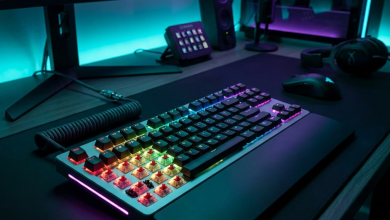
RGB lighting appears throughout the budget segment, typically with per-key illumination matching premium keyboards.
Software customization may be more limited, with some budget keyboards offering only onboard controls without
companion applications.
Media controls vary significantly. Some budget keyboards include dedicated media keys matching premium features,
while others omit these entirely or implement them as function-layer combinations. Evaluate media control importance
for your usage when comparing options.
Connectivity typically means wired USB for budget gaming keyboards. Wireless capability at sub-$100 prices generally
sacrifices gaming-grade latency or build quality elsewhere. Budget wireless options exist but require careful
evaluation to ensure gaming-suitable performance.
II. Best Gaming Keyboards Under $100 for 2026
These keyboards represent the strongest value propositions in the budget gaming segment, balancing gaming
performance, build quality, and feature sets at accessible prices.
Razer BlackWidow V4 X – $89
The Razer BlackWidow V4 X brings flagship BlackWidow features to accessible pricing, featuring Razer Green mechanical
switches in a full-size layout with Razer Chroma RGB lighting. The aluminum top plate provides premium feel unusual
at this price point, elevating build quality above typical budget competitors.
Razer Green switches offer clicky tactile feedback with 50g actuation force and 1.9mm actuation point. The audible
click confirms key registration definitively, though the sound may bother others nearby. For solo gaming setups, the
satisfying click enhances the gaming experience without social consequences.
Chroma RGB lighting integrates with Razer’s ecosystem for synchronized effects across Razer peripherals. Synapse 3
software provides extensive customization options including key remapping, macro recording, and lighting
configuration. The software overhead adds complexity some users prefer avoiding, but unlocks the keyboard’s full
potential for those willing to engage.
The included wrist rest enhances ergonomic comfort during extended sessions. Dedicated media controls including
volume roller provide convenient audio management without interrupting gameplay. Cable routing channels in the
chassis enable clean desk setup.
Pros: Aluminum construction unusual at price, excellent Chroma RGB, dedicated media controls,
included wrist rest, Synapse ecosystem integration, proven Razer switch technology.
Cons: Clicky switches only (no linear/tactile options), full-size only limits desk space options,
Synapse software required for full customization, non-detachable cable limits replacement options.
HyperX Alloy Origins Core – $69
The HyperX Alloy Origins Core offers tenkeyless (TKL) format at exceptional pricing, featuring HyperX Red linear
switches in an aircraft-grade aluminum body. At $69, it represents outstanding value for competitive gamers seeking
quality linear switches without numpad bulk.
HyperX Red switches provide 45g actuation with 1.8mm actuation point—slightly shorter than Cherry MX Red equivalents
for faster input registration. The linear feel suits rapid keypressess in competitive gaming without tactile bump
interruption. These switches rate for 80 million actuations, ensuring long-term reliability.
The full aluminum body creates a surprisingly solid keyboard for the price. No flex, no creaking, just rigid
construction that inspires confidence during intense gaming. The compact TKL footprint frees desk space for wider
mouse movements—valuable for low-sensitivity FPS players.
RGB lighting per-key with onboard controls provides customization without requiring software. HyperX NGENUITY
software optionally enables advanced configuration for users wanting deeper control. The detachable USB-C cable
simplifies transport and enables cable replacement if needed.
Pros: Exceptional build quality at $69, quality linear switches, TKL space-saving format, detachable
USB-C cable, onboard controls without software requirement, aluminum construction.
Cons: HyperX Red switches only (no switch options), TKL lacks numpad for users who need it, PBT
keycaps would improve upon included ABS, basic software features compared to competitors.
SteelSeries Apex 3 TKL – $49
At $49, the SteelSeries Apex 3 TKL represents the budget boundary for quality gaming keyboards. While technically
using membrane switches rather than mechanical, the Whisper-Quiet technology provides gaming-suitable performance at
prices challenging genuine mechanical alternatives.
The membrane switches offer 3mm actuation with quiet operation suitable for shared spaces or late-night gaming.
Response times exceed typical membrane keyboards, approaching mechanical performance while eliminating mechanical
switch costs. For budget-constrained gamers, this trade-off provides genuine value.
IP32 water resistance protects against accidental spills—a feature absent from nearly all mechanical keyboards at any
price. This protection provides peace of mind for gamers concerned about beverage accidents near expensive
equipment.
RGB lighting zones (not per-key) provide ambiance without the cost of individual LED addressing. SteelSeries Engine
software enables basic customization and integration with other SteelSeries products.
Pros: Exceptional value at $49, quiet operation ideal for shared spaces, IP32 water resistance
unique at price, TKL format saves desk space, SteelSeries brand reliability.
Cons: Membrane switches not truly mechanical, zone RGB rather than per-key illumination, fewer
features than mechanical alternatives, feel may disappoint mechanical keyboard users.
Keychron K8 – $84
The Keychron K8 brings enthusiast keyboard quality to budget pricing, featuring hot-swappable Gateron G Pro switches
in a wireless/wired TKL design. The enthusiast orientation provides capabilities budget keyboards from gaming brands
typically lack.
Gateron G Pro switches offer exceptional smoothness exceeding Cherry MX equivalents at lower cost. Red (linear),
Brown (tactile), and Blue (clicky) options accommodate different preferences. Hot-swap capability enables future
switch changes without soldering—swap to different switches as preferences evolve or upgrade to premium switches
later.
Bluetooth 5.1 connectivity supports up to three devices with device switching via function keys. The wireless
capability adds versatility for laptop users or multi-device workflows. USB-C wired mode provides gaming-grade
latency when wireless won’t suffice.
Mac and Windows layout options accommodate different operating system preferences. The orange-accented keycaps and
gray color scheme distinguish the K8 from typical gaming keyboard aesthetics—appealing to users wanting capability
without aggressive visual styling.
Pros: Hot-swap capability rare at price, excellent Gateron switches, wireless/wired flexibility,
switch type options, Mac/Windows compatibility, professional aesthetic alternative to gaming styling.
Cons: Limited gaming-specific features (no media keys), RGB less vibrant than gaming keyboards,
software less developed than major gaming brands, ABS keycaps standard (PBT upgrade option available).
Corsair K55 RGB Pro XT – $54
Corsair’s K55 RGB Pro XT offers full-size membrane gaming keyboard with dedicated macro keys at budget pricing. The
membrane switches sacrifice mechanical feel for quiet operation and spill resistance, prioritizing practicality over
enthusiast preferences.
Six dedicated macro keys provide programming capabilities typically reserved for premium keyboards. iCUE software
enables extensive macro creation and key remapping, with macros executing on-keyboard without requiring software
running.
Per-key RGB lighting with Corsair’s refined iCUE integration creates impressive lighting effects. Integration with
other Corsair products enables synchronized lighting across your entire setup.
IP42 dust and spill resistance protects against common desk hazards. Detachable wrist rest enhances comfort during
extended sessions. Full-size layout includes numpad for users requiring number input for gaming or productivity.
Pros: Dedicated macro keys at budget price, excellent iCUE software integration, per-key RGB
lighting, spill resistance protection, included wrist rest, full feature set.
Cons: Membrane rather than mechanical switches, rubbery key feel disappoints mechanical users,
plastic construction feels budget, larger footprint than TKL alternatives.
III. Comparison Table: Best Gaming Keyboards Under $100
Direct specification comparison enables quick evaluation based on prioritized features.
| Keyboard | Switch Type | Layout | RGB | Price |
|---|---|---|---|---|
| Razer BlackWidow V4 X | Razer Green (Clicky) | Full-Size | Per-Key Chroma | $89 |
| HyperX Alloy Origins Core | HyperX Red (Linear) | TKL | Per-Key RGB | $69 |
| Keychron K8 | Gateron G Pro (Options) | TKL | Per-Key RGB | $84 |
| Corsair K55 RGB Pro XT | Membrane | Full-Size + Macros | Per-Key RGB | $54 |
| SteelSeries Apex 3 TKL | Membrane (Whisper) | TKL | Zone RGB | $49 |
IV. Choosing the Right Layout for Gaming
Keyboard layout significantly impacts desk space and functionality. Understanding layout options helps select
appropriate form factor.
Full-Size (100%)
Full-size keyboards include numpad, function row, navigation cluster, and arrow keys—every possible key. Gamers who
use numpad for number input, secondary key bindings, or productivity tasks appreciate having everything accessible.
The width disadvantage matters for gamers using large mousepads with low sensitivity settings. Full-size keyboards
push the mouse further right, potentially creating ergonomic issues or limiting mouse space. Consider keyboard
placement relative to mouse requirements.
Tenkeyless (TKL/80%)
TKL keyboards remove the numpad while retaining function row, navigation cluster, and arrow keys. This provides
excellent compromise—most gaming-relevant keys remain while freeing significant desk space for mouse movement.
Competitive FPS players particularly favor TKL layouts. The space savings enable centered keyboard positioning with
adequate mouse space regardless of pad size. TKL represents the most popular gaming keyboard format.
Compact (75%/65%/60%)
Compact layouts further reduce size by removing navigation clusters and potentially function rows or arrow keys.
These layouts appeal to minimalists and desk space maximizers but require learning function layer access for missing
keys.
Gaming-specific compact keyboards often retain arrow keys for menu navigation while removing other elements. The
Fn-layer learning curve may frustrate users accustomed to dedicated keys, but adaptation typically occurs within a
week of regular use.
V. Switch Selection Guide
Switch type significantly impacts gaming and typing experience. Match switch characteristics to your preferences and
primary use cases.
Linear Switches for Gaming
Linear switches (Red variants) provide smooth, consistent actuation without tactile bump or audible click. This
consistency enables rapid, repeated keypresses ideal for gaming applications. Most competitive players prefer linear
switches for their gaming keyboards.
The smooth action means no physical feedback confirming key registration—you must bottom out or develop sensitivity
to actuation point for confirmation. Some users dislike this lack of feedback, particularly for typing applications.
Tactile Switches for Mixed Use
Tactile switches (Brown variants) provide a bump at actuation point without audible click. This feedback confirms key
registration without requiring bottom-out, potentially reducing fatigue during extended typing while remaining
suitable for gaming.
The bump slightly interrupts smooth rapid actuation compared to linear alternatives. For purely gaming use, this
represents a small disadvantage. For users who type extensively alongside gaming, the feedback improves typing
experience enough to justify gaming compromise.
Clicky Switches for Feedback Preference
Clicky switches (Blue variants) provide both tactile bump and audible click for maximum feedback. Some gamers prefer
this definitive confirmation despite the noise, particularly when gaming alone in soundproofed environments.
The click sound causes issues for voice communication, streaming, and shared spaces. Microphones capture keyboard
clicks, annoying teammates and stream viewers. Consider your usage context carefully before selecting clicky
switches.
VI. Additional Features to Consider
Beyond basic switch and layout selection, additional features may influence purchasing decisions.
N-Key Rollover (NKRO)
NKRO ensures every simultaneous keypress registers regardless of how many keys you press. Quality gaming keyboards
support full NKRO, preventing “ghosting” where certain key combinations fail to register. All keyboards in this
guide support NKRO.
Anti-Ghosting
Anti-ghosting specifically prevents phantom keypresses from appearing when multiple keys are pressed. All quality
gaming keyboards include anti-ghosting protection, though implementation quality varies slightly between models.
Polling Rate
Keyboard polling rate determines how frequently the keyboard reports to the computer. Standard 1000Hz polling (1ms
report interval) satisfies gaming requirements. Some keyboards offer higher polling rates, though benefits beyond
1000Hz remain minimal for keyboard input.
Onboard Memory
Onboard memory stores profiles directly on the keyboard, enabling settings to travel between computers without
software installation. Tournament players and multi-computer users benefit from this capability. Budget keyboards
vary in onboard memory inclusion.
VII. Budget Keyboard Upgrade Path
Starting with budget keyboards enables future upgrades as experience develops and budgets permit.
Keycap Upgrades
Replacing stock ABS keycaps with PBT alternatives dramatically improves feel and durability. Quality PBT keycap sets
cost $30-60 and fit any Cherry MX-compatible keyboard. This upgrade transforms budget keyboard typing experience
toward premium feel.
Switch Upgrades (Hot-Swap Keyboards)
Hot-swap keyboards like the Keychron K8 enable switch replacement without soldering. Start with stock switches, then
upgrade to premium options (Gateron Milky Yellow, Akko CS switches, etc.) as preferences develop. This approach
provides premium feel without premium initial investment.
Modifications
Simple modifications like switch lubing, stabilizer foam, and case dampening dramatically improve keyboard sound and
feel. YouTube tutorials guide these modifications, transforming budget boards into near-premium performers for
minimal cost.
VIII. Conclusion
The sub-$100 gaming keyboard market in 2026 delivers genuine value through quality mechanical switches, capable RGB
lighting, and durable construction. The HyperX Alloy Origins Core at $69 represents the strongest overall value for
competitive gamers seeking quality linear switches in TKL format with excellent build quality. The Razer BlackWidow
V4 X at $89 provides feature-rich gaming experience with premium construction for users wanting full-size keyboard
with complete feature set.
Budget-constrained buyers find capable options in the SteelSeries Apex 3 TKL at $49, accepting membrane switches for
significant cost savings. Enthusiasts preferring hot-swap capability for future customization should consider the
Keychron K8 at $84.
Regardless of initial purchase, budget keyboards enable upgrade paths through keycap replacement, switch changes on
hot-swap boards, and simple modifications. Starting budget doesn’t mean staying budget—these keyboards provide
excellent foundations for evolving gaming setups.
For complete keyboard guidance, explore our articles on mechanical keyboard
switch comparison and gaming
mouse recommendations.