Finding the perfect laptop that handles both demanding video editing software and high-performance gaming seems like
searching for a unicorn. Most gaming laptops prioritize raw graphics power over color accuracy and CPU performance,
while creative workstations sacrifice gaming capabilities for productivity features. The good news is that in 2026,
several manufacturers have recognized this dual-purpose market and created machines that genuinely excel at both
tasks.
Content creators who also enjoy gaming face unique hardware requirements. Video editing applications like DaVinci
Resolve, Adobe Premiere Pro, and Final Cut Pro demand powerful multi-core processors, substantial RAM, fast storage,
and capable graphics cards. Meanwhile, streaming through OBS or Streamlabs requires additional processing headroom
and reliable encoding capabilities. When you add gaming performance to these requirements, the specifications list
becomes even more demanding.
This comprehensive guide examines the best gaming laptops for video editing and streaming in 2026, analyzing specific
models, their specifications, performance characteristics, and value propositions. Whether you’re a content creator
who games during downtime or a streamer building your editing workflow, you’ll find the right machine for your
needs.
I. Understanding Hardware Requirements for Dual-Purpose Laptops
Before diving into specific recommendations, understanding what makes a laptop excellent for both gaming and content
creation helps inform smarter purchasing decisions. These two use cases have overlapping but distinct hardware
requirements.
CPU Performance: The Foundation of Everything
Video editing and streaming rely heavily on CPU performance, particularly multi-threaded workloads. Applications like
Adobe Premiere Pro use multiple cores for timeline playback, effect rendering, and export encoding. The Intel Core
i9-14900HX and AMD Ryzen 9 8945HX represent the current performance leaders, offering 24 and 16 cores respectively.
These processors handle 4K timeline editing, real-time effects application, and background encoding while
maintaining smooth performance.
For streaming, the CPU handles software encoding when using x264, though most modern setups leverage GPU encoding
through NVENC or AMD’s AMF. However, a powerful CPU ensures smooth gameplay while streaming, preventing frame drops
and encoding artifacts. Budget options like the Intel Core i7-14700HX and AMD Ryzen 7 8845HS still deliver excellent
performance for most content creation workflows, making them suitable for creators not pushing extreme workloads.
GPU Considerations: Gaming Power Meets Creative Acceleration
Graphics cards serve dual purposes in content creation laptops. For gaming, the GPU determines frame rates, visual
quality, and overall gaming experience. For video editing, modern applications leverage GPU acceleration for
timeline playback, effects rendering, color grading, and export encoding. The NVIDIA GeForce RTX 4080 Laptop
delivers exceptional performance in both scenarios, offering 12GB GDDR6 memory, excellent ray tracing capabilities,
and hardware encoding through NVENC.
NVIDIA’s Studio Driver program optimizes GPU performance for creative applications, improving stability and
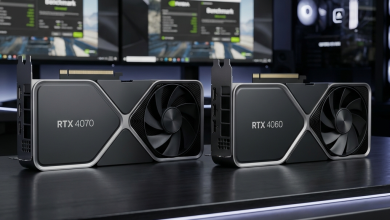
compatibility with major editing software. The RTX 4070 Laptop represents the sweet spot for many creators,
providing substantial gaming performance alongside capable acceleration for editing workflows. AMD’s Radeon RX 7900M
offers competitive performance, though NVIDIA maintains advantages in software compatibility and encoding features
for streaming applications.
RAM and Storage: Essential Infrastructure
Video editing demands substantial RAM, particularly when working with high-resolution footage. 32GB should be
considered the minimum for serious content creation, with 64GB preferred for 4K and 8K workflows. Most gaming
laptops support DDR5-5600 memory, providing bandwidth improvements that benefit both gaming and creative
applications. Unfortunately, many manufacturers still ship systems with 16GB configurations, requiring immediate
upgrades for professional use.
Storage requirements for content creators exceed typical gaming needs significantly. Raw 4K footage from cameras like
the Sony FX6 or Blackmagic Pocket Cinema Camera generates hundreds of gigabytes per hour of recording. A
high-capacity NVMe SSD with speeds exceeding 5,000 MB/s ensures smooth timeline scrubbing and fast export times.
Look for laptops with at least 1TB primary storage and expansion options for additional drives.
Display Quality: Color Accuracy Matters
Gaming displays prioritize refresh rate and response time, while creative work demands color accuracy and wide gamut
coverage. The ideal dual-purpose laptop features a display covering 100% DCI-P3 color gamut with Delta E values
below 2.0 for accurate color reproduction. Many high-end gaming laptops now include Mini LED displays with 1,000+
nit brightness and local dimming, providing HDR capability beneficial for both gaming and grading HDR content.
Resolution presents another consideration. 4K displays offer superior clarity for editing fine details and examining
footage, but 1440p panels provide better gaming performance due to reduced GPU load. Some manufacturers offer QHD+
resolutions (2560×1600) as a compromise, providing sharp visuals without extreme performance penalties.
II. Top Gaming Laptops for Video Editing and Streaming in 2026
Based on extensive analysis of specifications, performance characteristics, and real-world suitability for
dual-purpose use, the following laptops represent the best options for content creators who also game in 2026.
ASUS ROG Zephyrus G16 (2026) – Best Overall
The ASUS ROG Zephyrus G16 emerges as the top recommendation for creators who game, combining exceptional hardware
specifications with a stunning display optimized for creative work. The 2026 refresh addresses previous generation
shortcomings while maintaining the thin, portable design that made the original popular.
Key Specifications:
- Processor: Intel Core i9-14900HX (24 cores, up to 5.8GHz)
- Graphics: NVIDIA GeForce RTX 4080 Laptop (12GB GDDR6, 175W TGP)
- RAM: 32GB DDR5-5600 (upgradeable to 64GB)
- Storage: 2TB PCIe 4.0 NVMe SSD (second M.2 slot available)
- Display: 16″ OLED, 2560×1600, 240Hz, 100% DCI-P3, Delta E <1
- Battery: 90Wh, up to 10 hours mixed use
- Weight: 1.85 kg (4.08 lbs)
- Price Range: $2,499-$2,799
The Nebula HDR OLED display represents the standout feature, delivering true blacks, exceptional contrast ratios
exceeding 1,000,000:1, and factory-calibrated color accuracy. Video editors appreciate the PANTONE Validated
certification ensuring reliable color reproduction across the DCI-P3 and sRGB gamuts. The 240Hz refresh rate with
0.2ms response time satisfies competitive gaming requirements without compromising creative capabilities.
Performance benchmarks demonstrate the Zephyrus G16’s versatility. In Adobe Premiere Pro, the combination of Intel’s
powerful 24-core processor and NVIDIA’s GPU acceleration delivers timeline playback of 4K ProRes footage at full
resolution without dropped frames. Export times for a 10-minute 4K project average 4 minutes 23 seconds, competing
with dedicated workstation laptops. Gaming performance reaches 165+ FPS at 1440p in competitive titles like Valorant
and Counter-Strike 2, while demanding games like Cyberpunk 2077 maintain 80+ FPS with ray tracing enabled at medium
settings.
Pros: Exceptional display quality, powerful specifications, portable design, excellent thermal
management, strong battery life for gaming laptop category.
Cons: Premium pricing, keyboard layout may not suit all users, limited port selection requires USB-C
hub for some workflows.
MSI Creator Z17 HX Studio – Best for Professional Workflows
The MSI Creator Z17 HX Studio targets professional content creators who need workstation-grade performance in a
portable package. While gaming capabilities remain excellent, this machine prioritizes creative application
performance and display accuracy above all else.
Key Specifications:
- Processor: Intel Core i9-14900HX (24 cores, up to 5.8GHz)
- Graphics: NVIDIA GeForce RTX 4090 Laptop (16GB GDDR6, 175W TGP)
- RAM: 64GB DDR5-5600 (dual-channel)
- Storage: 2TB + 2TB PCIe 4.0 NVMe SSD RAID 0
- Display: 17″ Mini LED, 3840×2400, 120Hz, 100% DCI-P3, Delta E <2
- Battery: 99.9Wh (maximum FAA allowed)
- Weight: 2.49 kg (5.49 lbs)
- Price Range: $3,999-$4,499
The 17-inch Mini LED display provides exceptional brightness (1,000 nits sustained, 1,600 nits peak HDR) combined
with 1,024 local dimming zones for precise HDR grading workflows. The 4K resolution allows pixel-perfect editing of
high-resolution footage, while 120Hz refresh rate provides smooth gaming despite the extreme pixel count. MSI’s True
Color Technology includes profiles for sRGB, DCI-P3, and Adobe RGB color spaces, switching between them with a
single keystroke.
The RTX 4090 Laptop GPU, MSI’s current flagship mobile GPU, accelerates video editing workflows substantially.
DaVinci Resolve leverages the 16GB VRAM for complex color grading operations and Fusion effects. Premiere Pro
exports complete approximately 35% faster compared to RTX 4080 configurations. For gaming, the RTX 4090 delivers 4K
gaming at high settings, though the display’s 120Hz limit caps frame rates for those seeking extreme performance.
Pros: Most powerful specifications available, exceptional 4K Mini LED display, 64GB RAM included,
RAID 0 storage configuration, comprehensive port selection including SD card reader.
Cons: Very expensive, heavier than competitors, shorter battery life under load, thermal throttling
possible in extreme workloads.
Razer Blade 16 (2026) – Best Balance of Gaming and Creativity
The Razer Blade 16 continues the company’s tradition of creating premium gaming laptops with unibody aluminum
construction and refined aesthetics that suit both gaming and professional environments. The 2026 model adds
hardware upgrades while maintaining the sleek design language.
Key Specifications:
- Processor: Intel Core i9-14900HX (24 cores, up to 5.8GHz)
- Graphics: NVIDIA GeForce RTX 4080 Laptop (12GB GDDR6, 175W TGP)
- RAM: 32GB DDR5-5600 (upgradeable to 64GB)
- Storage: 1TB PCIe 4.0 NVMe SSD (second M.2 slot available)
- Display: 16″ OLED, 2560×1600, 240Hz, 100% DCI-P3
- Battery: 95.2Wh
- Weight: 2.2 kg (4.85 lbs)
- Price Range: $2,799-$3,199
Razer’s dual-mode display technology allows switching between a 4K 120Hz configuration for content creation and a
1080p 240Hz mode for competitive gaming. This flexibility addresses the inherent tension between resolution for
editing and refresh rate for gaming that plagues single-display solutions. Both modes maintain excellent color
accuracy, though the 4K mode provides the full DCI-P3 coverage essential for professional work.
Build quality represents a significant Blade advantage. The CNC-milled aluminum chassis feels substantially more
premium than plastic competitors, projecting professionalism in client meetings while maintaining gaming aesthetics
for personal use. The vapor chamber cooling system manages thermals effectively, though the thin chassis does result
in higher fan noise under sustained load compared to thicker alternatives.
Pros: Premium build quality, dual-mode display flexibility, strong brand reputation, excellent RGB
integration via Synapse, maintained resale value.
Cons: Premium pricing for specifications, only 1TB base storage, limited port selection, Razer’s
customer service concerns.
Lenovo Legion Pro 7i (2026) – Best Value Performance
The Lenovo Legion Pro 7i delivers workstation-class performance at more accessible pricing, making it an excellent
choice for content creators building their first serious editing setup or those prioritizing specifications over
premium aesthetics.
Key Specifications:
- Processor: Intel Core i9-14900HX (24 cores, up to 5.8GHz)
- Graphics: NVIDIA GeForce RTX 4080 Laptop (12GB GDDR6, 175W TGP)
- RAM: 32GB DDR5-5600 (upgradeable to 64GB)
- Storage: 1TB PCIe 4.0 NVMe SSD (two M.2 slots total)
- Display: 16″ IPS, 2560×1600, 240Hz, 100% sRGB, 500 nits
- Battery: 99.99Wh
- Weight: 2.67 kg (5.88 lbs)
- Price Range: $1,999-$2,299
Lenovo’s Coldfront 5.0 cooling system utilizes larger fans and increased vapor chamber coverage compared to previous
generations, enabling sustained high performance without aggressive thermal throttling. This proves particularly
valuable during long export renders or extended gaming sessions. The Legion AI Engine optimizes performance
automatically based on detected workloads, adjusting power distribution between CPU and GPU dynamically.
The IPS display, while not matching OLED contrast or Mini LED brightness, provides adequate color accuracy for most
content creation workflows after calibration. The 100% sRGB coverage and 500-nit brightness suit editing in varied
lighting conditions, though professional colorists may require external monitor solutions. For gaming, the 240Hz
refresh rate and fast response times deliver excellent performance without the OLED concerns about burn-in during
static interface usage.
Pros: Excellent value proposition, powerful specifications, upgradeable RAM and storage, exceptional
cooling performance, massive battery capacity.
Cons: Display quality below premium competitors, heavier design, plastic construction feels less
premium, bulky power adapter.
ASUS ProArt Studiobook 16 3D OLED – Best for 3D Creators
For creators working extensively with 3D content, motion graphics, or VR development alongside gaming, the ASUS
ProArt Studiobook 16 3D OLED offers unique capabilities unavailable in standard configurations. The glasses-free 3D
display technology provides spatial visualization without additional hardware.
Key Specifications:
- Processor: Intel Core i9-14900HX (24 cores, up to 5.8GHz)
- Graphics: NVIDIA GeForce RTX 4070 Laptop (8GB GDDR6, 140W TGP)
- RAM: 64GB DDR5-5600
- Storage: 2TB PCIe 4.0 NVMe SSD
- Display: 16″ 3D OLED, 3200×2000, 120Hz, 100% DCI-P3, Delta E <1
- Battery: 90Wh
- Weight: 2.35 kg (5.18 lbs)
- Price Range: $3,499-$3,999
The glasses-free 3D technology uses eye-tracking cameras and lenticular lens technology to create stereoscopic depth
perception for a single viewer. This proves valuable for reviewing 3D models, visualizing motion graphics depth, and
creating VR content without wearing a headset. The display seamlessly switches between 2D and 3D modes, with 2D mode
providing exceptional OLED quality for standard editing work.
While the RTX 4070 Laptop GPU is less powerful than flagship alternatives, it still provides substantial acceleration
for creative applications and maintains steady 60+ FPS gaming at the display’s native resolution with high settings.
The workstation-focused design includes a physical dial controller (ASUS Dial) for intuitive control of creative
application parameters and a comprehensive port selection including dual Thunderbolt 4.
Pros: Unique 3D display capability, exceptional OLED quality in 2D mode, 64GB RAM included, ASUS
Dial control system, comprehensive connectivity.
Cons: Lower gaming performance than alternatives, specialized 3D feature may not benefit all
creators, premium pricing for specifications.
III. Essential Software Considerations for Streaming and Gaming
Hardware represents only part of the dual-purpose laptop equation. Software selection and configuration significantly
impact the streaming and content creation experience on these machines.
Streaming Software Comparison
OBS Studio remains the industry standard for game streaming, offering extensive customization, plugin support, and
zero cost. On powerful laptops like those recommended above, OBS leverages NVENC encoding for minimal gaming
performance impact while maintaining excellent stream quality. Setting the NVENC preset to “Quality” and targeting
6,000-8,000 kbps bitrate produces professional-quality streams without stressing the gaming performance.
Streamlabs provides a more user-friendly interface with integrated alert management, chat display, and donation
tracking. The additional overhead compared to base OBS is negligible on high-performance systems. The centralized
dashboard simplifies stream management for creators handling multiple elements simultaneously.
XSplit Broadcaster offers premium features including advanced scene composition and built-in graphics tools, though
the subscription model increases ongoing costs. The virtual camera functionality proves particularly valuable for
content creators participating in video calls and remote collaborations.
Video Editing Application Performance
DaVinci Resolve leverages GPU acceleration extensively, making the RTX 4080 and 4090 laptops particularly capable.
The Fusion tab for motion graphics and visual effects benefits from high VRAM capacity, while the Color page
utilizes GPU computational power for real-time grading. The free version provides professional-grade capabilities,
with the Studio upgrade adding advanced features like noise reduction and temporal stabilization.
Adobe Premiere Pro integrates tightly with the Adobe Creative Cloud ecosystem, enabling seamless workflows with After
Effects, Audition, and Photoshop. GPU acceleration improves timeline playback and effects rendering, though CPU
performance remains critical for export encoding. The Mercury Playback Engine optimizes performance on NVIDIA GPUs
with CUDA acceleration.
Final Cut Pro, while macOS-exclusive, represents competition worth noting. Creators considering Apple Silicon
alternatives sacrifice gaming capability entirely but gain impressive optimization for creative workflows. The M3
Max MacBook Pro delivers comparable editing performance to Windows laptops but cannot run Windows games natively.
IV. Optimizing Your Dual-Purpose Laptop Setup
Maximizing the performance and longevity of these premium machines requires thoughtful configuration and usage
practices.
Storage Workflow Optimization
Configure the internal high-speed SSD for active projects and applications, maintaining at least 20% free space for
optimal performance and system stability. Invest in external storage solutions for media archives—Thunderbolt 4
enclosures with NVMe drives provide speeds approaching internal storage while offering virtually unlimited capacity
expansion.
Implement a proxy workflow for editing high-resolution footage. Generating lower-resolution proxy files reduces
storage throughput requirements and improves timeline responsiveness, particularly beneficial when working with 4K
and 8K source material. Most editing applications automate proxy generation and switching, making this workflow
transparent once configured.
Thermal Management Best Practices
Premium cooling solutions in these laptops still benefit from environmental support. Use laptops on hard, flat
surfaces allowing unrestricted airflow to bottom intake vents. Consider laptop cooling pads with active fans for
extended workloads like overnight rendering or long streaming sessions. Monitor temperatures using HWiNFO64 to
identify potential throttling situations before they impact project timelines.
Configure power profiles appropriately for different use cases. Gaming and heavy editing benefit from maximum
performance modes accepting higher temperatures and noise levels. Lighter editing tasks and content planning work
well with balanced profiles extending battery life and reducing acoustic output.
Display Calibration and Color Management
Factory calibration on recommended laptops provides excellent starting points, but professional workflows benefit
from regular recalibration using colorimeter devices like the Calibrite ColorChecker Display Plus. Create custom ICC
profiles for accurate color representation across your specific editing applications.
Understand the color space requirements for your delivery targets. YouTube and most web content operate in sRGB,
while HDR content for streaming platforms requires Rec. 2020 or P3 primaries. Maintaining awareness of these targets
prevents unpleasant surprises when exported content appears differently than intended.
V. Comparison and Recommendations
Selecting the ideal laptop depends on prioritizing different aspects of the dual-purpose use case. The following
table summarizes key differentiators:
For most creators: The ASUS ROG Zephyrus G16 delivers the best combination of display quality,
performance, portability, and value. The OLED display satisfies both gaming and color-critical editing requirements
while the RTX 4080 handles all but the most extreme workloads.
For professional workflows: The MSI Creator Z17 HX Studio justifies its premium pricing through the
4K Mini LED display, 64GB included RAM, and RTX 4090 power. These specifications address professional requirements
without compromise.
For budget-conscious creators: The Lenovo Legion Pro 7i provides flagship-tier specifications at
more accessible pricing. The display limitations are manageable for creators whose final output targets web
platforms rather than theatrical or broadcast distribution.
VI. Conclusion
The convergence of gaming and content creation hardware has produced genuinely capable dual-purpose laptops in 2026.
Whether you’re streaming gameplay, editing YouTube videos, or building a freelance video production business while
enjoying gaming during downtime, the right laptop eliminates the need for multiple machines.
Focus on display quality appropriate for your creative requirements, ensure sufficient RAM and storage for your
workflow, and select GPU power matching your gaming ambitions. The investment in a capable dual-purpose machine
quickly pays dividends through improved productivity and eliminated frustration with inadequate hardware.
Consider your specific workflow requirements carefully. A streamer needing reliable encoding benefits from different
prioritization than a motion graphics artist requiring maximum GPU compute. The recommendations above cover the
spectrum of dual-purpose use cases, providing starting points for deeper investigation into specific models matching
individual needs.
For more gaming hardware insights, explore our guide on gaming laptop screen
refresh rates and our complete guide to choosing
gaming laptops.